Personalization tags
Personalization is a great way to tailor the message to each customer and increase engagement using dynamic content. CartBounty offers various personalization tags allowing easy customization of each abandoned cart reminder message.
1. How personalization tags work
Personalization tags available in CartBounty are based on abandoned cart data that can be seen in the abandoned cart table. To personalize your message and insert dynamic content tags, you can either use personalization button located next to input fields or enter the tag manually.
Example: If you would like to include recipient’s Name in the subject field of an email message, you would add [name] tag to the input field. Once CartBounty sends the message – tag will be changed into recipient’s name.
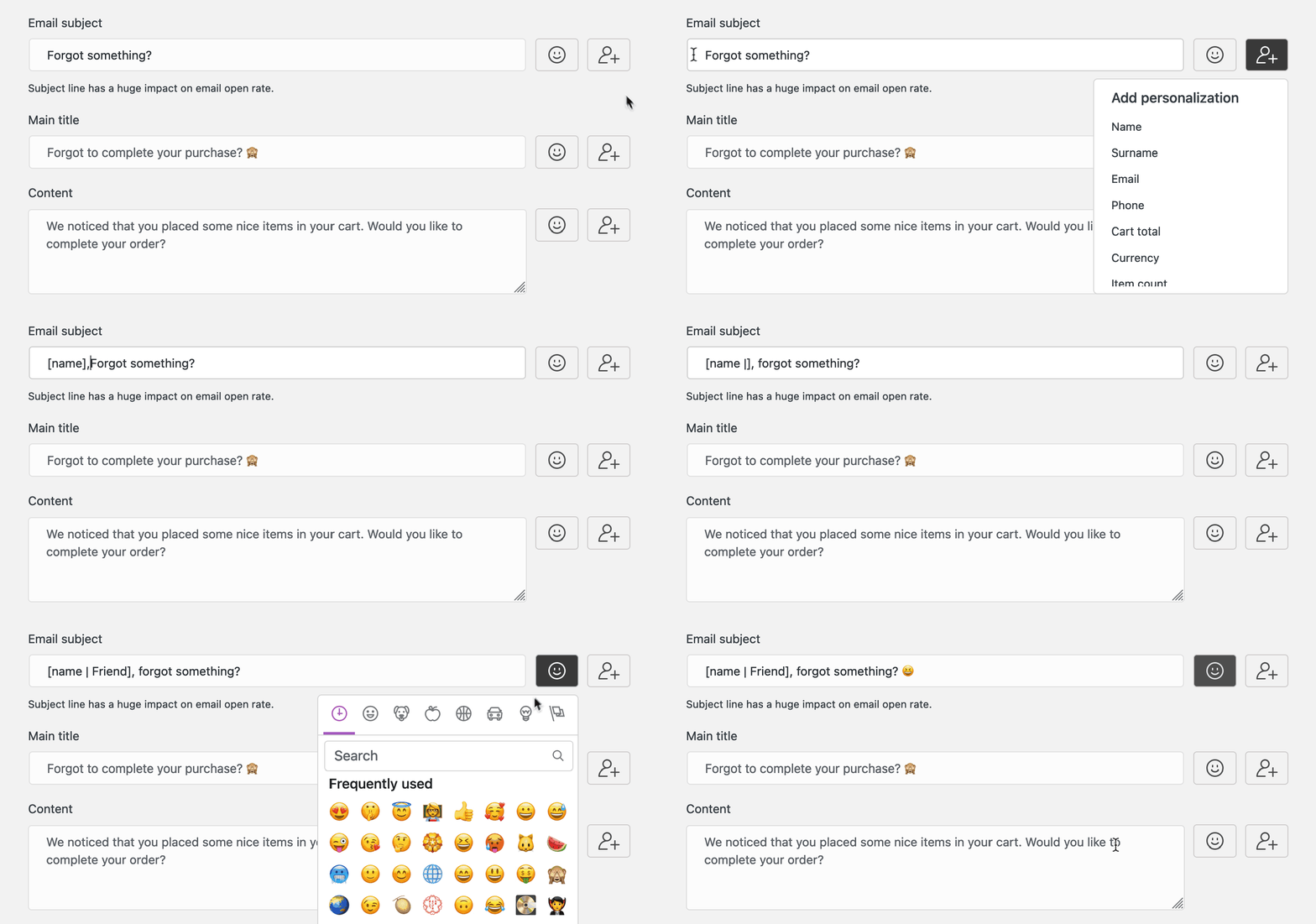
Fallback terms
There can be situations when a specific tag you have added to your message lacks relevant data (e.g. Name of the customer is empty). This could result in a weird message therefore CartBounty allows setting a fallback term to each tag – a word or words, that will be used to substitute empty data.
Please use the following syntax to add a fallback term to any of the available tags:
[tag | Fallback text here]Fallback can also contain HTML tags inside it:
[tag | Fallback <i>with</i> HTML here]Please note that if a fallback term is added to
[recovery_link | Restore cart]or[unsubscribe_link | Click to unsubscribe], it does not work as a fallback term, but instead will change the name of the link inside the message.
2. Conditional tags
Apart from basic personalization tags, CartBounty also allows conditional tags which add additional layer of personalization and allow even greater message customization.
Conditional tags support IF, ELSEIF, and ELSE statements. You can also place conditions inside other conditions to create more personalized messages.
Here is an example of a conditional tag that checks how many products are in the cart and outputs appropriate result:
Collect your [if: item_count >= 2]products[else]product[endif].Conditional tag syntax
Conditional tag syntax using an operator (view available operators)
Use a comparison operator to check if a personalization tag matches a specific value. Depending on the result, CartBounty will display either the first or the alternative content.
[if: tag = value] Output if condition is TRUE [else] Output if condition is FALSE [endif]Conditional tag without comparison operator (boolean comparison)
Use this to check if a personalization tag contains a value. For example, you can check whether the customer’s name or a coupon code is available.
[if: tag] Output if comparison is TRUE [else] Output if comparison is FALSE [endif]Conditional tag without [else] statement
If you only want to display additional content when a specific condition is met, you can leave out the [else] statement. When the condition is false, no content will be displayed.
[if: tag] Output if condition is TRUE [endif]Multiple IF, ELSEIF, ELSE conditions
Use [elseif:] to check several conditions and display different content depending on which condition is met. CartBounty will display the first matching outcome and skip the remaining conditions.
[if: item_count = 1]You left one product in your cart[elseif: item_count = 2]You left two products in your cart[else]You left several products in your cart[endif].Nested conditions
You can place conditional statements inside other conditional statements to create more personalized messages. For example, first check whether a coupon is available and then check what type of discount it provides.
[if: coupon]
    Use coupon [coupon] to get [coupon_amount]
    [if: discount_type = percent]
        %
    [else]
        [currency]
    [endif]
    off your order!
[else]
    Your cart is still waiting for you!
[endif]
Multiple comparisons using AND / OR
You can combine multiple comparisons inside a single conditional tag using AND and OR operators. This allows you to create more specific conditions based on several customer or shopping cart details. Use AND when all comparisons must be true. For example, display a message when the cart contains at least 2 but fewer than 20 products:
[if: item_count >= 2 AND item_count < 20]You left several products in your cart![endif]Use OR when at least one of the comparisons must be true. For example, display a message for customers from United States or Canada:
[if: country = US OR country = CA]Special message for North American customers![endif]CartBounty checks conditions in the order they appear. Once a condition is met, its content is displayed and the remaining conditions are skipped. You can add as many [elseif:] statements as needed. The [else] statement is optional and is displayed only when none of the preceding conditions are met. Nested conditions can contain additional [elseif:] statements and further nested conditions.
Important things to remember:
- Every
[if:]statement must end with a matching[endif], including conditions placed inside other conditions. [elseif:]statements must appear after[if:]and before the optional[else].- You can combine multiple comparisons inside a condition using
ANDandOR. If both operators are used,ANDtakes precedence overOR. - Please use spaces around
ANDandORoperators. Parentheses are not supported inside conditional statements. - You can use personalization tags such as
[name]and[coupon]inside the message content, but not inside another tag’s square brackets.
Conditional tags can make the message more complex, please test your messages thoroughly before sending them out.
Conditional tags in WhatsApp reminders
Conditional tags also work in WhatsApp reminders, including multiple [elseif:] statements, nested conditions and multiple comparisons using AND and OR. When using conditional tags in WhatsApp messages, we recommend including an [else] statement to make sure your message contains text regardless of which condition is met.
Hi [name | there]! [if: coupon]Use coupon [coupon] to get a discount![else]Your cart is still waiting for you![endif]This ensures that customers receive a relevant message whether a coupon is available or not.
Available operators
These are available operators that can be used in conditional statements.
| Operator | Meaning |
|---|---|
= | equal to |
!= | not equal to |
> | greater than |
< | less than |
>= | greater than or equal to |
<= | less than or equal to |
AND | all comparisons must be true |
OR | at least one comparison must be true |
3. Personalization examples
Here is a list of commonly used personalization examples that should help with building your own content.
Show different content when a coupon is available
Use personalization tags to display different message content depending on whether a coupon code is available. This allows you to show a discount message when a coupon exists or an alternative message when it does not.
[if: coupon]We have added a little extra for you 😊. Use coupon [coupon] to get [coupon_amount][if: discount_type = percent]%[else] [currency][endif] off your order![else]Your cart is about to expire — complete your purchase before it is gone.[endif]The above example displays the coupon amount with % for percentage discounts or with the cart currency for fixed discounts. If no coupon exists, the customer receives the alternative content.
Display content based on location
You can use [country] tag to personalize message according to customer’s country. Similarly you can use [city] and [postcode] tags. For example, display a different message for customers from the US, Canada, and the rest of the world.
[if: country = US]Content for US customers[elseif: country = CA]Content for Canadian customers[else]Content for the rest of the world[endif]Translate content for different audiences
Using [language] tag to change the message according to customer’s language. See our translations page to learn about other translation options.
[if:language = es]Spanish content here[endif]Product specific content
You can use OR to display a more relevant reminder when a customer has abandoned one of several specific products. For example, if product IDs 86 and 87 represent two models of running shoes, you could use this example.
[if: product_id = 86 OR product_id = 87]Still thinking about your new running shoes? Your selected pair is waiting for you![else]Your selected product is still waiting in your cart! Complete your purchase today.[endif]Different delivery messages based on customer location and cart value
If your store offers different free shipping thresholds depending on the delivery country, you can use conditional tags to remind customers when their cart meets the required amount. For example, a store offering free shipping for orders above $75 in the US and $100 in Canada could use this example.
[if: country = US AND cart_total >= 75]Good news! Your cart qualifies for free shipping within the US.[elseif: country = CA AND cart_total >= 100]Your cart qualifies for free shipping within Canada![else]Your saved cart is waiting for you. Return to checkout to review your delivery options.[endif]4. Available tags
Below is a list of all available tags that you can use to personalize your abandoned cart reminder messages and increase your abandoned cart recovery ratio.
| Tag | Description | Example value |
|---|---|---|
[name] | Customer first name | John |
[surname] | Customer last name | Brown |
[email] | Customer email | john@email.com |
[phone] | Customer phone | 10026441642 |
[country] | Customer country | US |
[city] | Customer city | New York |
[postcode] | Customer postcode | 10005 |
[language] | Customer language | en |
[cart_total] | Cart total | 320.16 |
[currency] | Cart currency | USD |
[item_count] | Item count inside cart | 2 |
[product_id] | Product ID | 86 |
[coupon] | Coupon code | FT4RY_W6R37 |
[discount_type] | Coupon type | percent, fixed_cart, fixed_product |
[coupon_amount] | Coupon amount | 15 |
[coupon_expiry] | Coupon expiration date | Jan 24, 2023 |
[recovery_link] | Recovery link | <a href=”… |
[unsubscribe_link] | Unsubscribe link | <a href=”… |
[store_name] | Store name | CartBounty |
What’s next
You might also be interested in the following topics:
